Deutsch · English · Nederlands
‹ Wohnmobil-Akte – product page
‹ All topicsEnergy (Victron)
Battery, solar, generator or shore power and consumers of your Victron system – live in the app.
Setting up
- Put your iPhone, iPad or Mac on the same Wi-Fi as the Cerbo.
- In the app, open Settings › Devices in the vehicle › Victron access and switch it on.
- Under Address, leave “venus.local” or enter the Cerbo’s IP address. For Access, “Web interface (port 80)” usually works without any further setting on the Cerbo.
- Tap Test connection. If your iPhone asks about the local network, tap “Allow”.
- When “Connected – system found” appears, you are done. Under Values shown you choose what appears in the Energy section.
What you see
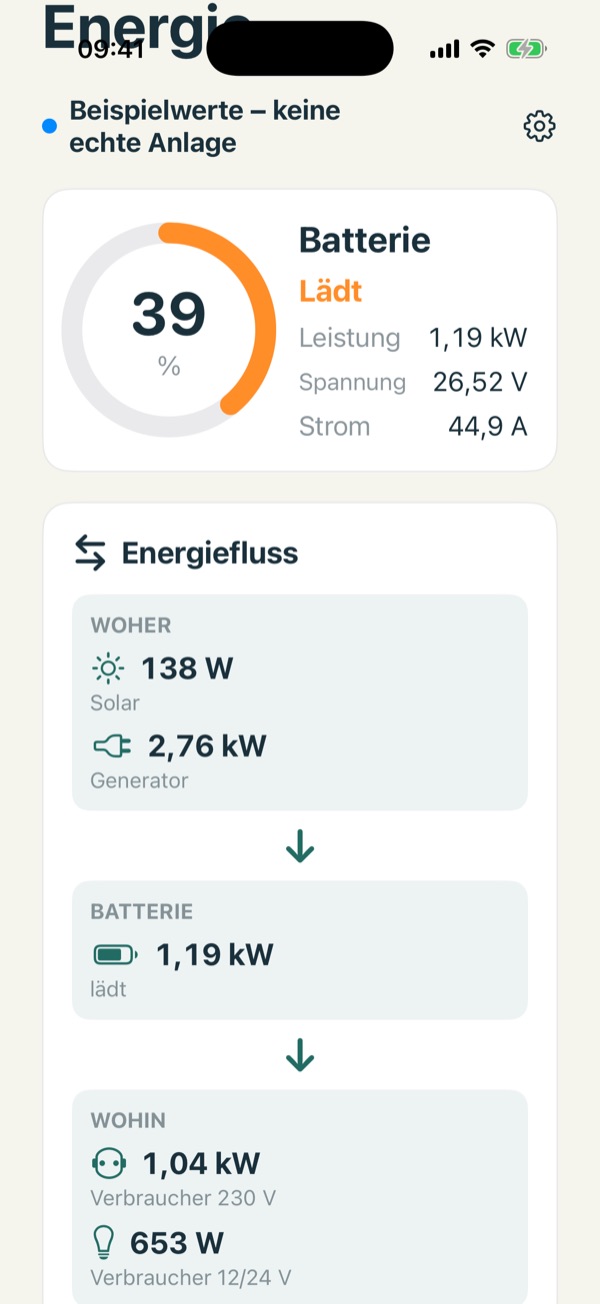
Battery: state of charge as a ring, plus whether it is charging or discharging, power, voltage and current.
Energy flow: From (solar, generator or shore power), Battery and To (consumers 230 V and 12/24 V).
Your values: the values you selected in the settings.
At the top you see whether the values are live. If the connection is lost, the app shows the last values faded with “Last updated …”.
Frequently asked questions
It says “Device not reachable”.
Check that the device is on the same Wi-Fi as the Cerbo and that “Local Network” is allowed for Wohnmobil-Akte (iOS Settings › Wohnmobil-Akte). If the address is “venus.local”, try the Cerbo’s IP address; you find it on the Cerbo under Settings › Network.
It says “Connection refused”.
For the access “MQTT (port 1883)”, the MQTT access switch must be on at the Cerbo under Settings › Integrations. Don’t confuse it with “MQTT devices” on the same page – that is for devices that send data into the Cerbo. Or choose the access “Web interface” in the app.
It says “VRM portal ID missing”.
The app looks for the system itself. If it does not report, enter the VRM portal ID. You find it on the Cerbo under Settings › VRM online portal.
Does it work on the road without Wi-Fi?
No. The app reads the values directly from the Cerbo on the local network, not via the internet. Outside the Wi-Fi you see the last received values marked as outdated.
Is it safe?
The app only reads. But if no password is set on the Cerbo, any device on the same Wi-Fi can read and possibly control the system. That is a property of the Cerbo, not the app. A security profile with a password (Cerbo: Settings › General) is recommended; signing in with a password is coming in one of the next versions of the app.
Do I have to enter the Cerbo’s address twice?
No. If the Cerbo is already listed under Connected, Victron access offers “Use address from “Connected””.
Wohnmobil-Akte manual · As of 11 Nov 2026 · Image with example values · Screenshots show the German version of the app.