Deutsch · English · Nederlands
‹ Wohnmobil-Akte – product page
‹ All topicsOvernight stays & pitches
Your motorhome pitches and overnight spots in one place, with Campercontact code, sharing and search in the well-known pitch apps.
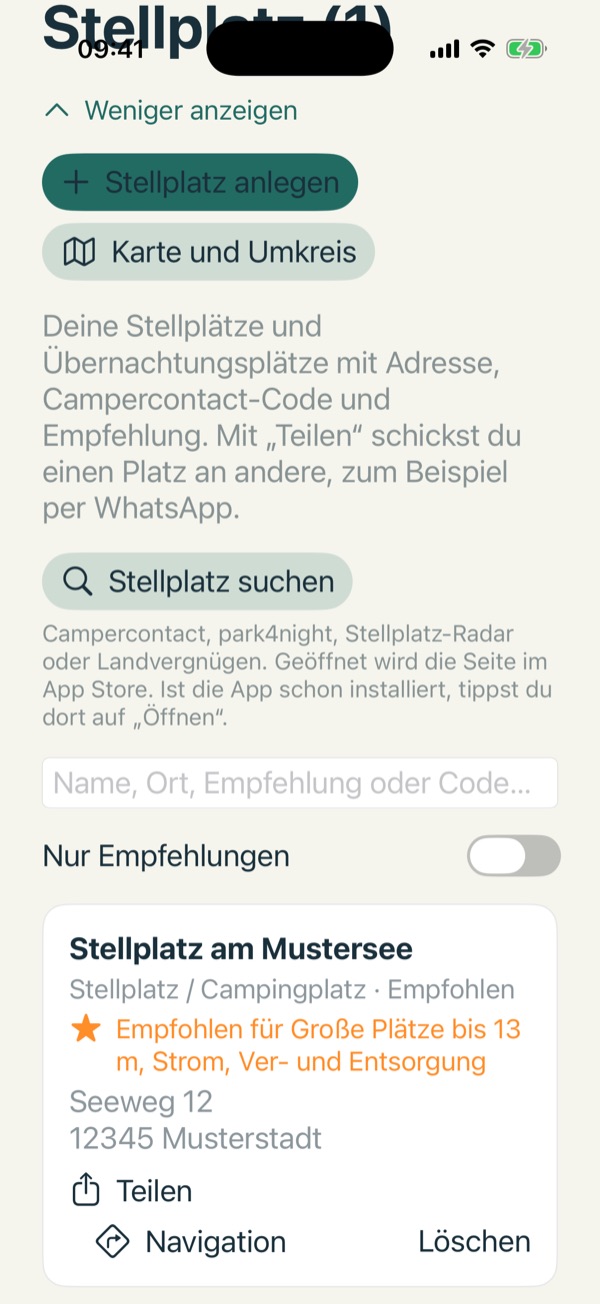
Adding a pitch
- Below the heading, tap Add and more, then Add pitch.
- Enter the Name of the place and the address in the fields for street, postcode, place and country.
- Under Campercontact, enter the Site code and, if you like, the link from the Campercontact app (‘Share’ → ‘Copy’).
- If you like the place, switch on Recommended and under Recommended for enter what for, for example ‘large pitches up to 13 m, electricity’.
- Save.
Share
Every pitch has a Share button. To drive there, tap Navigation and choose Apple Maps, Google Maps, Waze, TomTom GO or Copy address for any other app (more on this under Addresses). Sharing sends the name, address, recommendation, Campercontact code and link, phone, website and links for Apple Maps and Google Maps. Your notes stay in the file and are not sent.
Find a pitch
Find a pitch offers four apps: Campercontact, park4night, Stellplatz-Radar by promobil and Landvergnügen. This opens the app’s page in the App Store. If the app is already installed, tap Open there; otherwise you can download it there.
Frequently asked questions
Why are my pitches no longer listed under Addresses?
To keep Addresses clear: that’s where dealers, workshops, restaurants and other contacts are. You’ll find all places with the role Pitch here.
Can I see the places on a map?
Yes, via Add and more → Map and radius. You can also start the route from there.
Does the app search for pitches itself?
No. The search takes place in the providers’ apps. Wohnmobil-Akte remembers the places you want to keep.
Wohnmobil-Akte manual · As of 16 Oct 2026 · Images with demo data · Screenshots show the German version of the app.