Deutsch · English · Nederlands
‹ Wohnmobil-Akte – product page
‹ All topicsInspections & appointments
MOT (the German roadworthiness test, HU/TÜV), gas safety check, damp / leak test and services, with the next due date, the history and the certificate to show. For Dutch vehicles: APK.
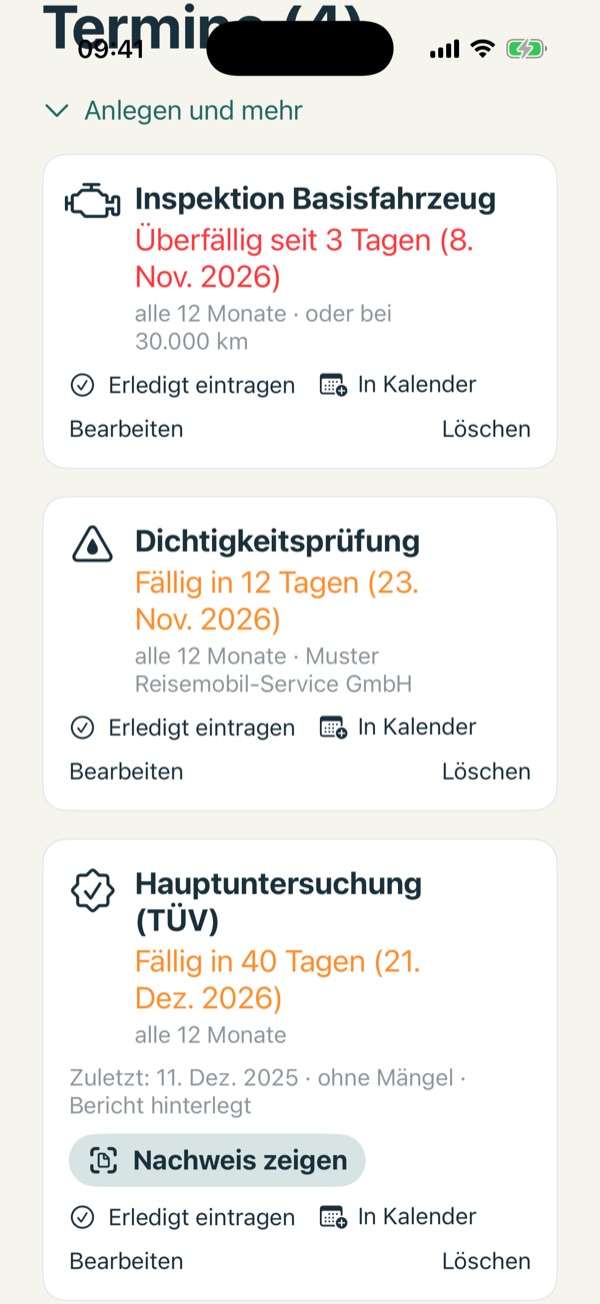
- Below the heading, tap Add and more, then Add common inspections, or enter them one at a time with Add inspection or appointment.
- For each inspection, enter the next date, optionally a mileage as well, and the workshop or testing station.
- After the inspection, use Mark as done: date, mileage, result and the inspection report or sticker – scan it or add it as a photo or PDF.
- If the report says until when the inspection is valid, enter it under Valid until (per report). That becomes the next date. Otherwise the app calculates it from the interval, for example 24 months for the gas safety check.
- With Add to Calendar a single appointment goes into your calendar, with a reminder two weeks beforehand. Automatically for all inspections: see Automatically in the calendar.
Due on …: the next date, if it is still more than 60 days away.
Due in … days in orange: the date falls within the next 60 days.
Overdue by … in red: the date has passed. Time to book a workshop appointment.
On the home screen, the Inspections & appointments tile always shows the next date that is due.
Adding an inspection that is already done
When you set up the app, the last inspection has usually already been done and the report is in a drawer. Add it right away: create the inspection or tap Edit, then under Already done? tap Enter last inspection.
Enter the date of the inspection, the result and the report as a photo or PDF, and the invoice if you like. The app works out the next due date from it: date plus interval, or “valid until” if the report states it.
Older reports go in via Add an earlier inspection in the history. The next due date always follows the most recent inspection; an older report you add later does not move it.
Show certificate
If you have added a report to an inspection, its card shows Show certificate. One tap opens the latest report full screen – handy at a roadside check, at the dealer or for the warranty.
Vehicle from the Netherlands: APK
- At the top of Inspections & appointments, choose “Netherlands” under Vehicle registered in. The main inspection is then called APK (RDW); the gas safety check is not suggested, as it is not required in the Netherlands.
- After the APK, use Mark as done and scan the keuringsrapport. The app reads the inspection date, “Geldig tot”, mileage, result and testing station itself and shows below what it took over. Please check it briefly.
- “Geldig tot” becomes the next APK date.
In the Netherlands you don’t have to carry the keuringsrapport. Other countries may ask for it – with Show certificate you have it with you.
For motorhomes the APK is usually due every year; petrol vehicles up to 3,500 kg less often in the first years. The exact date is on the report.
Invoice for an inspection
Report and invoice belong in different places: the report stays with the inspection, the invoice is listed under Invoices and counts towards your expenses.
When you Mark as done, tap Create invoice under Invoice. The app fills in title, date, testing station and the report; you add the amount. If the invoice already exists, choose Link existing invoice.
The inspection then shows “Invoice: €89.00” (tap to see the receipt) and the invoice shows “Belongs to: gas safety check on …”. If report and invoice are the same PDF, the file is stored only once.
Automatically in the calendar
In Settings under Calendar, switch on “Add appointments to Apple Calendar” and allow access. All due inspections then appear in your default calendar, with a reminder 14 days before. The entry carries the vehicle’s name, for example “Smart ForTwo: MOT”.
When an inspection is done and the next date moves on, the app moves the entry. If you delete the inspection, the entry disappears.
Frequently asked questions
The app took nothing from the RDW report.
This works with clearly readable scans of the Dutch keuringsrapport. If a value is not recognised, the field stays empty – just enter it yourself.
How does the app know the intervals?
The usual intervals are pre-filled, for example 24 months for the gas safety check under G 607 (the German technical rule for gas systems in motorhomes). Check them for your vehicle and change them if necessary.
Wohnmobil-Akte manual · As of 14 Nov 2026 · Images with demo data · Screenshots show the German version of the app.