Deutsch · English · Nederlands
‹ Wohnmobil-Akte – product page
‹ All topicsFolder
View a folder from Dropbox or iCloud Drive inside your file.
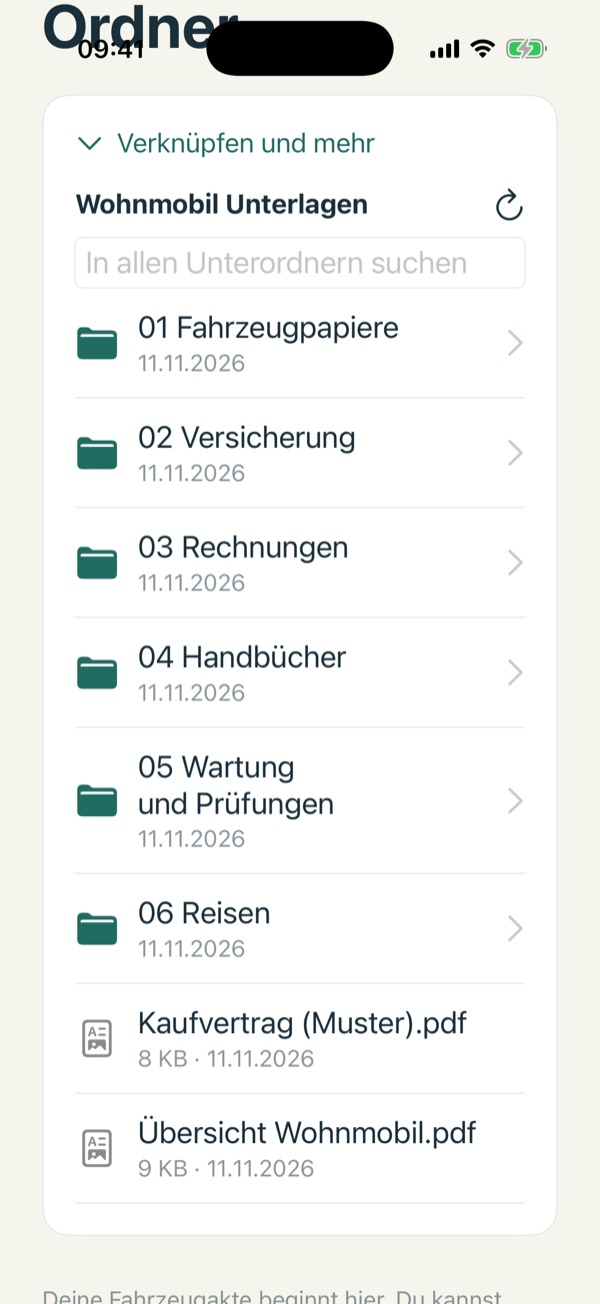
- Open the Folder tile, expand Link and more and tap Choose folder ….
- In the file picker, choose the folder, for example in Dropbox or iCloud Drive.
- Tap a file to open it in the preview; you can also share it from there. If a file is only in the cloud, the app downloads it first (“Loading …”).
The link applies per device. Choose the folder once on each iPhone, iPad and Mac; Dropbox must be installed on each of these devices and switched on in the Files app under “Locations”.
Frequently asked questions
A file won’t open.
The app tells you why, with an error code below. “Not on this device”: open the file once in the Files app or in the provider’s app (Dropbox, OneDrive) and try again. “No access to the linked folder any more”: tap Choose folder again … and pick the same folder. “No connection”: check your internet connection.
Does this help the developer?
Yes. If it doesn’t work, send the error code via Feedback in the app, ideally with a screenshot.
Wohnmobil-Akte manual · As of 3 Nov 2026 · Images with demo data · Screenshots show the German version of the app.