Deutsch · English · Nederlands
‹ Wohnmobil-Akte – product page
‹ All topicsDrives
All recorded drives by day, the last location of your vehicle and the way there.
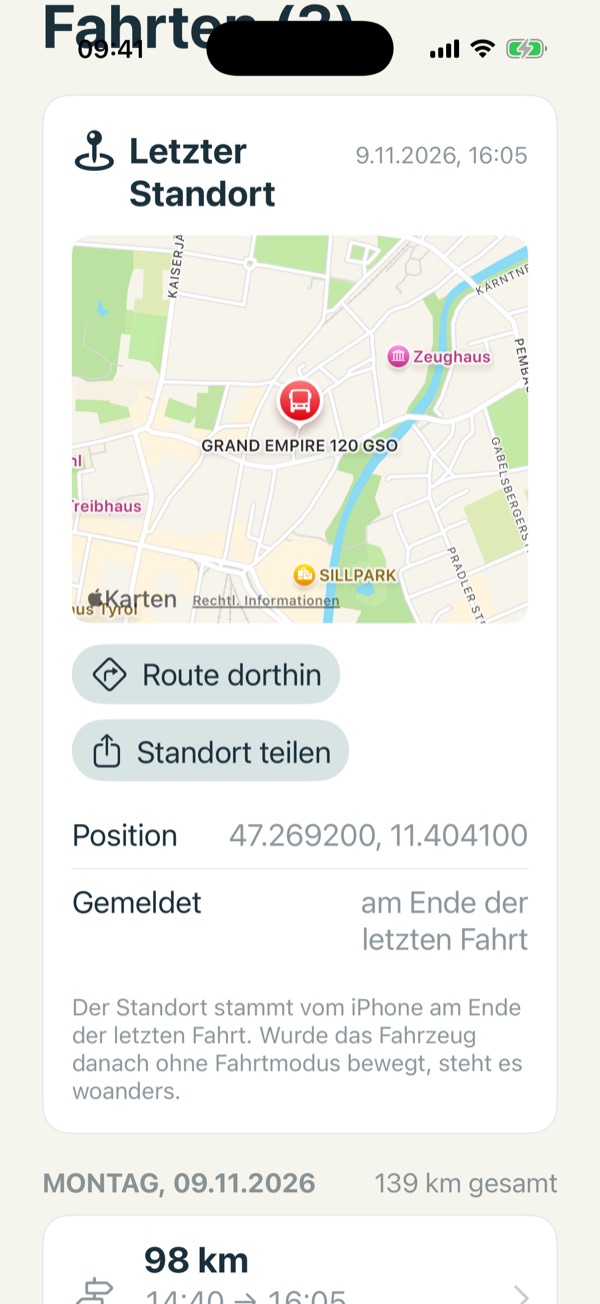
- Before you drive, open Before departure and tap Set off. The app counts time and kilometres with the iPhone’s GPS.
- At your destination, tap End drive. This creates a drive report.
- Under Drives you find the drives by day, with the day’s total, for example “502 km total”.
- Tap a drive: the report shows distance, total time, driving time, top and average speed, stops and the route on the map. There you can also assign the drive to a trip or delete it.
Last location
The map at the top shows where the last drive ended – where your vehicle is most likely parked.
Directions opens Apple Maps, Google Maps, Waze or TomTom.
Share location sends a map link by message, mail or WhatsApp, for example to your family.
Frequently asked questions
Why is a drive missing?
Drives are only recorded in drive mode, from “Set off” to “End drive”. Very short drives under one minute and under 100 metres are not saved.
Do I see my drives on all devices?
Yes. Drives are stored in your file and reach your iPhone, iPad and Mac via iCloud.
Can I connect my own GPS device?
Not yet. External devices, for example a RaceBox, are planned for later.
How is this different from trips?
A drive is a single journey, a trip the whole holiday with stops, nights and costs. More under Trips and drives.
Wohnmobil-Akte manual · As of 3 Nov 2026 · Images with demo data · Screenshots show the German version of the app.